Cyberpunk Terminal UI Framework
Pause a remote job and keep your place.
The problem.
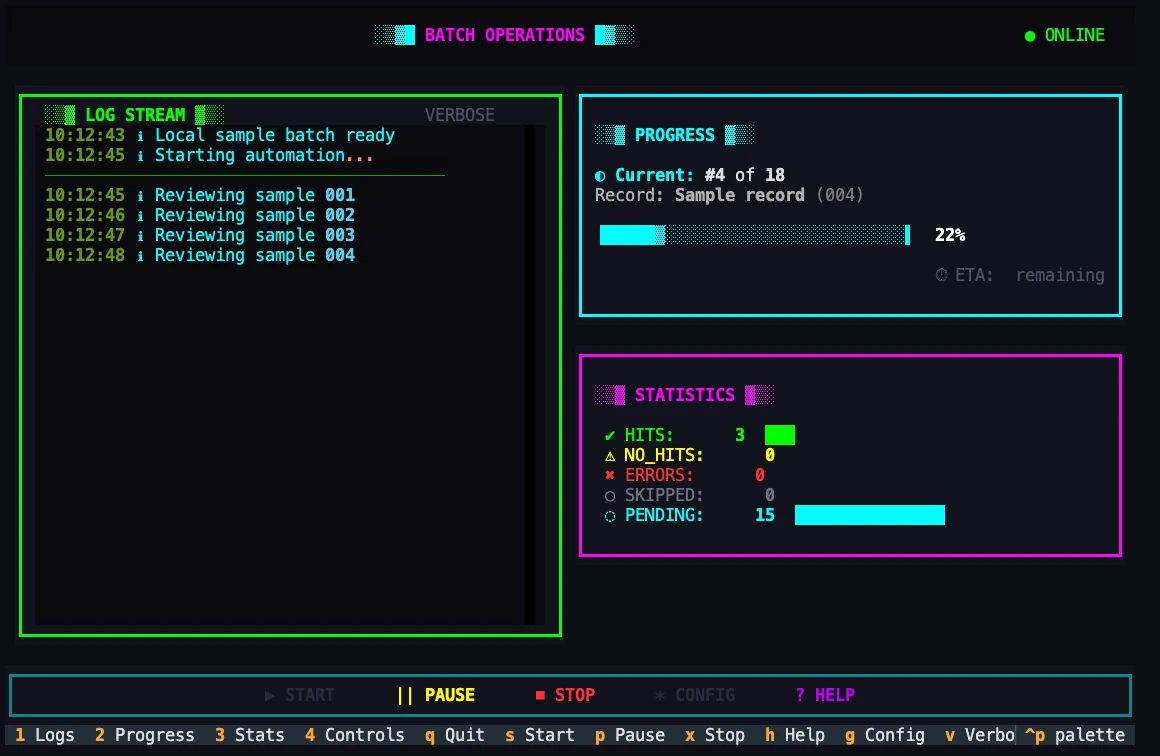
An operator watching a long batch needs to know which record is active, what has finished and whether the job can be paused from the same terminal.
Role I designed the keyboard interactions and built the terminal views and asynchronous state management with Textual and Rich.
Approach I separated the worker state from the Textual widgets that present it. Progress, counters and available keyboard commands update together when processing pauses.
PythonTextualRichasyncioRun a batch at the terminal
How it connects.
Keyboard-first interaction / real-time streams / terminal design
- 01KEYBOARD INPUT
- 02TEXTUAL + RICH
- 03ASYNC STREAMS
- 04OPERATOR VIEW
Implementation evidence.
Two states of the same job
The running and paused examples use the same record position and counters. The paused state replaces the time estimate with a status and enables Resume.
Reading progress alongside events
A worker can keep emitting events while the operator moves between controls. The display consumes those updates asynchronously so a long operation can keep its own state.
Headless operation is a design constraint
An operator can select a job, inspect its events and pause it from a remote terminal using only the keyboard.
Outcomes
- Progress and recent events remain visible in the same remote session.
- Operators can pause, resume or abort a running job from the keyboard.